Env Bar
A fixed bar utility at the top of the page.
Many applications can have different environments, such as local, staging, sandbox, and production. In this scenario, it becomes a bit risky to have the same application open in different browser tabs, interacting with each of the environments. The TallStackUI EnvBar is a sticky helper at the top of the page that allows you to easily identify the environment you are interacting with through various visual information associated with different cores per environment. The EnvBar is different from the environment component , the environment component is very simple compared to the EnvBar. The EnvBar is an official TallStackUI package installed via composer.
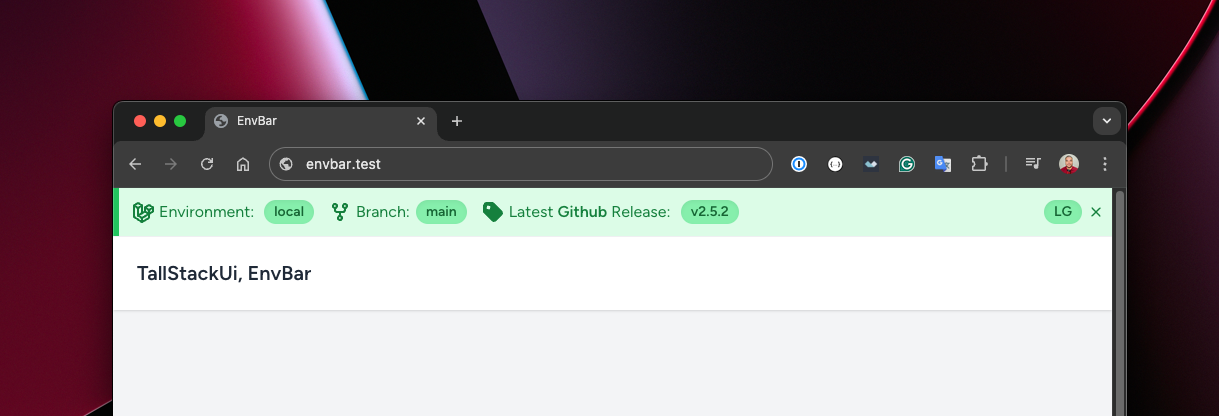
As you can see in the example above, the environment is "local", so this determines the green color for all visual elements of the EnvBar. There are colors for: local, staging and sandbox, because we understand that EnvBar will not be used in production - although it is possible, through a visualization scheme by authenticated user. By default the defined color scheme is:
- local - shades of green colors
- staging - shades of yellow colors
- sandbox - shades of orange colors
composer require tallstackui/envbar:^2.0EnvBar will be automatically injected into your application. If you prefer to determine where it should be injected instead of accepting automatic injection, you can use @envbar anywhere in your layout.
php artisan vendor:publish --tag=envbar-configThere are several useful settings available through the config/envbar.php configuration file, however most of them can be set through environment variables. Here is the list of all available environment variables:
By default, EnvBar does not work in the production environment. This is because it is important to read this documentation in its entirety before using it in production. Therefore, to activate EnvBar in production you must:
- Enable the production environment in the configuration file.
- Set the ENVBAR_FOR_AUTHENTICATED_USERS_ENABLED environment variable as true .
- Optionally, set ENVBAR_FOR_AUTHENTICATED_USERS_GUARD auth guard. Default is web .
- Optionally, create a Laravel Gate to control which users will see the EnvBar.
use App\Models\User;use Illuminate\Support\ServiceProvider;use Illuminate\Support\Facades\Gate; class AppServiceProvider extends ServiceProvider{ // ... public function boot(): void { Gate::define('envbar::view', function (User $user) { return in_array($user->email, [ ]); }); }}You can customize the color scheme for each environment in the configuration file:
// ... 'environments' => [ 'local' => 'green', 'staging' => 'yellow', 'sandbox' => 'orange', // 'production' => 'red',], // ...All colors are based on the TailwindCSS color scheme.
You can control which pages the EnvBar will be ignored on via the configuration file.
// ... 'ignore_on' => [ 'pulse.*', 'horizon.*', 'telescope.*',], // ...Behind the scenes, this feature uses Request::routeIs to check the current route.
To avoid multiple requests to the git provider, the latest release is cached for ENVBAR_*_CACHED_FOR day(s). If you want to clear the release cache, you can clear the entire application cache or run the following command to clear the release cache only, without affecting the other cache:
php artisan envbar:flushIf you are using ENVBAR_CLOSABLE_TIMEOUT and you closed the EnvBar, you can use the command below to show the EnvBar again without waiting for the final minutes timeout to run out:
php artisan envbar:showThe EnvBar has the ability to display links in a dropdown to serve as a collection of documents or development materials. You have two ways to define these links, either through the ENVBAR_LINKS environment variable or through the configuration file. In addition, links can have a label associated with a link or just links, where the label will be the link itself.
-
Only link:
ENVBAR_LINKS="https://google.com.br,https://github.com"
-
Label and link:
ENVBAR_LINKS="Google|https://google.com.br,GitHub|https://github.com"
EnvBar has its own dedicated repository. For this reason, issues, pull requests should be submitted to this repository instead of the official TallStackUI repository. We don't have releases on there, only tags.